
GTA 6 Bang! For Your Buck: How the Arcade Deer Hunt Game Works
How Bang! For Your Buck works in GTA 6: shoot bucks not does, build kill streaks, watch your ammo and cash counter, and read the end-of-stage grade screen.
Skip to the guideBang! For Your Buck is a rail-shooter arcade game you can play inside GTA 6. It plays on a retro screen with a cowboy mascot and oil derricks around the frame, and it runs through short stages in a wooded park. This guide explains the rules, the HUD, how scoring and the results screen read, and what we could not confirm. It is based on a full play-through of the game’s stages.
Quick version: shoot bucks, never does · watch the ammo icons and reload in the gaps · chain hits to build a kill streak · the cash total at the top climbs with each hit · the results screen adds up each category and gives a letter grade.
What the game is
The attract screen shows the Bang! For Your Buck logo above a character in a white hat. A sponsor card for an organisation called POACH appears before it, and an announcer introduces the setting as Cash Creek Reserve with the line that time is money. Later stages are described as set in Greenback Park, so expect the wording to joke about banks and cash throughout.

The one rule that matters
Before the first stage, the game shows two signs: Shoot Bucks with a green tick and Don’t Shoot Does with a red cross. That is the whole targeting rule, so check what you are aiming at before you fire.

The stage then counts you in with a GO! banner and you start from a parked vehicle at the park entrance.

Reading the HUD
The screen is minimal:
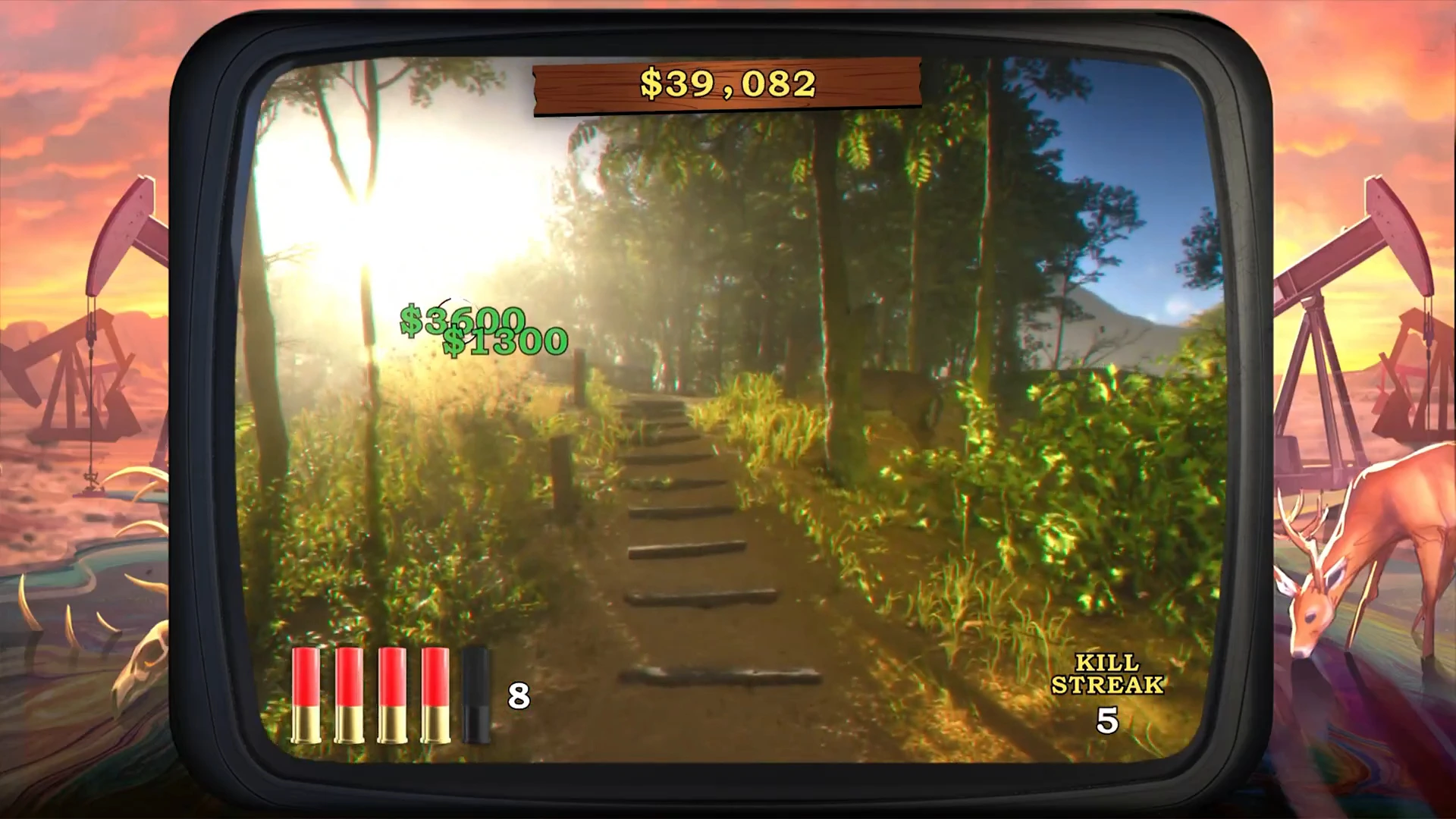
- Cash total in a wooden plaque at the top. It went up and down in the footage as the player scored and lost money.
- Floating dollar amounts over targets, which show what a hit is worth. Different targets paid different amounts, from about $1,200 to over $6,000 in the frames we saw.
- Ammo icons bottom-left with a number beside them. The icons changed between bullets and shotgun shells in different stages, and a bigger magazine appeared at times.
- Kill streak counter bottom-right, which reset to a low number after a miss or a stop.
- Banners such as Killing Frenzy when the streak climbed.
Staying alive on ammo
The ammo bar drained to zero a few times in the footage, so empty-gun pauses cost points. Short stretches between targets are the time to reload, and the shotgun icons held only a handful of shells while the bullet icons held many more. We did not see a button prompt for reloading, so we do not name one.
Stages and the results screen
The game ran through several stages in the woods, on dirt tracks and through a rocky canyon with a wooden walkway. A Stage Complete banner ends each one, then a Get Ready card starts the next. The player’s run ended on a results board that lists eight rows:
- A stag icon with a kill count and cash earned (82 of 135 and $372,500 in our run).
- A doe icon with its count and a cash figure in red (4 of 28 and $24,000), which looks like a penalty for shooting the wrong animals. We have not confirmed that.
- Three more animal and bonus icons with their own counts and cash.
- A target icon with a percentage, which looks like accuracy (118%).
- A clock icon with a time number (251).
- A letter grade (A++ in the final run, C in an earlier stage) and a total, $387,400 here.
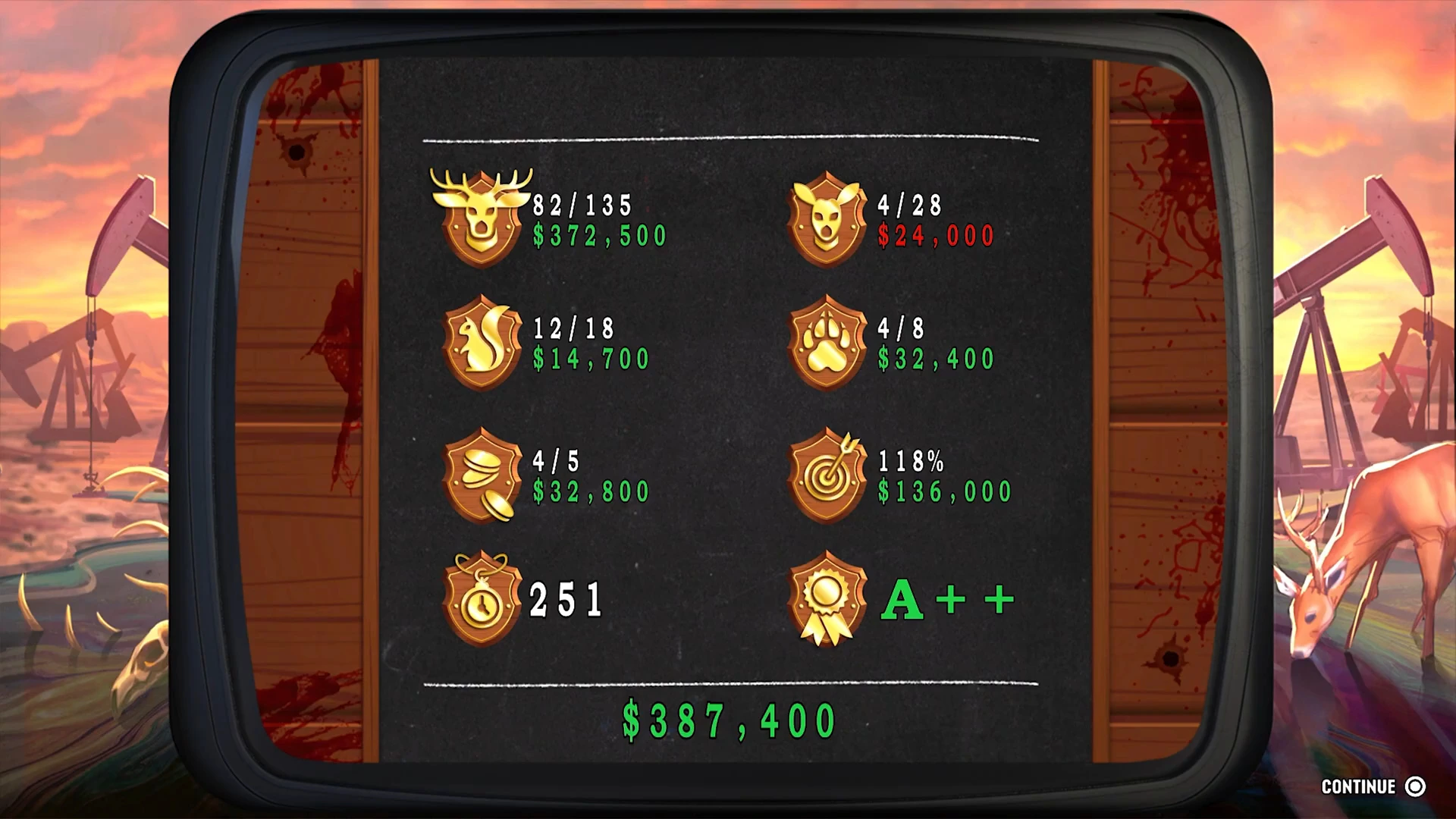
The icons are not labelled on screen, so treat our reading of each row as an interpretation, not a rule.
What we have not confirmed
- Where the cabinet is and how you start a game.
- Controls. No button prompts appeared during play.
- Whether the cash is real. We did not see the total change your wallet.
- Rewards or trophies for a high grade.
- What each results-row icon means exactly.
More GTA 6 guides
- GTA 6 best side activities
- GTA 6 fishing and animals
- GTA 6 how to play 8-ball pool
- GTA 6 King Gator adventure golf
- GTA 6 apps and social media
- GTA 6 easter eggs